
Detailed Description
The Add New Customer article explains how to create and manage customer profiles in the Services module of Futex Logix. Adding customers correctly helps ensure smooth service delivery, accurate pricing, contract linking, and invoice generation within the fleet management knowledge base.
- Click on the Services option in the top menu.
- Click on the Services option in the top menu.
- Then click on the Customer page.
- After opening the Customer page, the list of customers will appear.
- Click on the Plus (+) button to add a new customer.
- Fill in the required details and click the Save button.
Visual Walkthrough
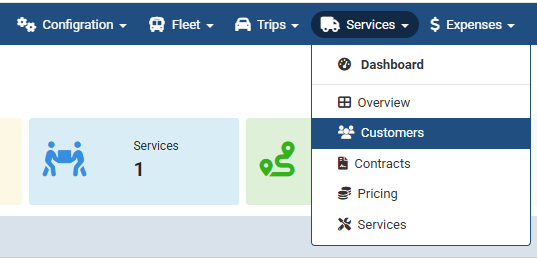
When to Add a New Customer : Click on the Customers page to add a new customer.

When to Add a New Customer :
Click the plus (+) button to add a new customer.
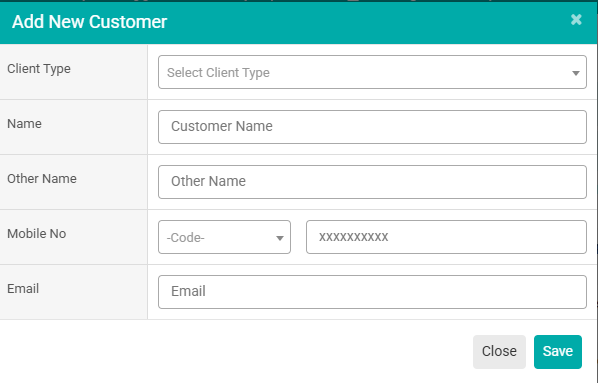
When to Add a New Customer :
Fill in details such as Type (Organization/Individual), Name, Other Name, Mobile Number, and Email Address & Click Save button.
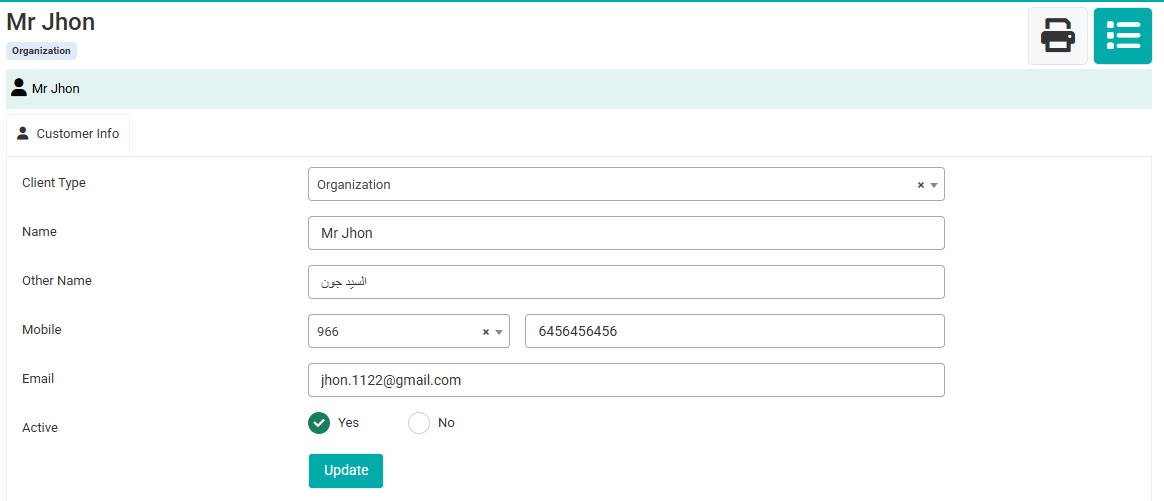
When to Add a New Customer :
If you need to make any changes to a customer’s profile, update them from here.
No video tutorial available.
No related articles found in this category.