
Add Attendance Rule allows users to create and configure attendance rules in Futex HR, including working duration, overtime rate, deduction rate, consecutive days, leave deduction days, and other attendance-related settings.
1. Click on Attendance > Settings > Attendance Rule.
2. Click on the + (Add) button to create a new attendance rule.
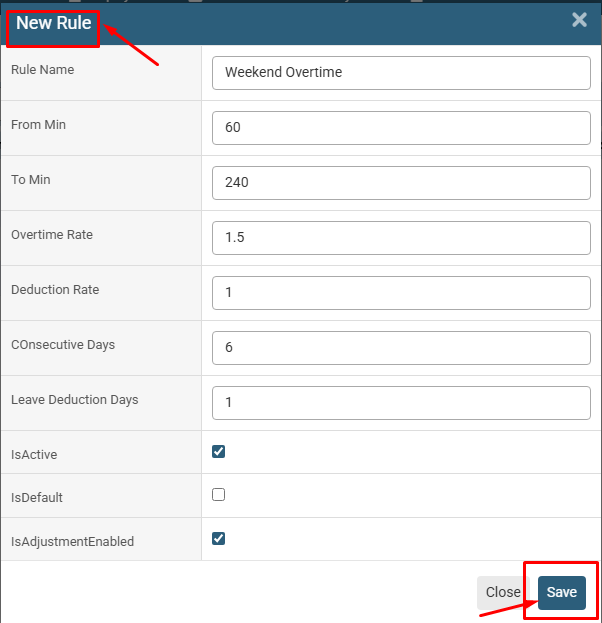
3. Enter the required Rule Name, From Min, To Min, Overtime Rate, Deduction Rate, Consecutive Days, and Leave Deduction Days.
4. Select the required options for IsActive, IsDefault, and IsAdjustmentEnabled.
5. Click on the Save button to add the attendance rule.
6. The newly created attendance rule will be displayed in the Attendance Rule list.
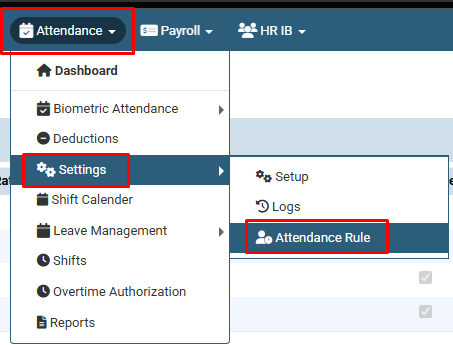
Click on Attendance > Settings > Attendance Rule.
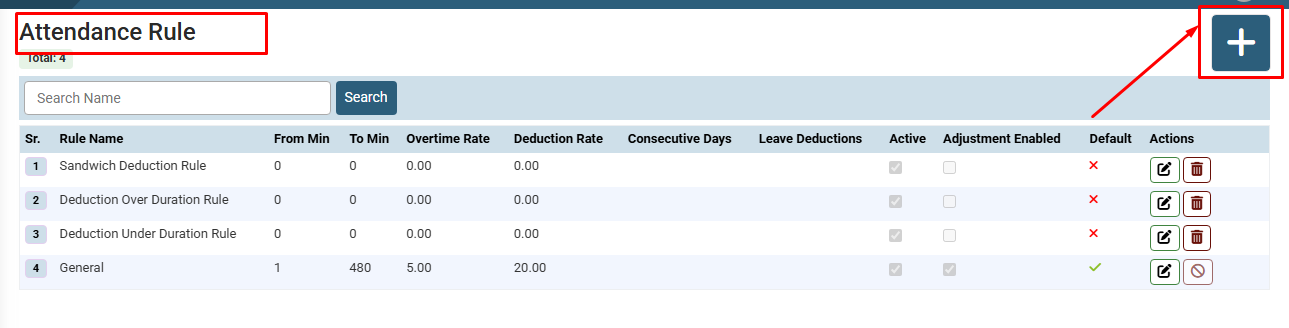
Click on the + (Add) button to create a new attendance rule.

The newly created attendance rule will be displayed in the Attendance Rule list.
No video tutorial available.
No related articles found in this category.
