
Detailed Description
Visual Walkthrough
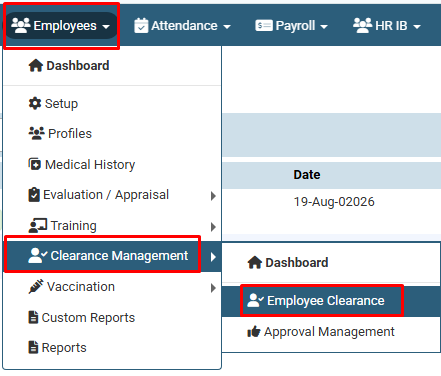
How to Add Employee Clearance :
Click on Employees > Clearance Management > Employee Clearance.

How to Add Employee Clearance :
On the Clearance Management page, click on the “+” (Add) button.
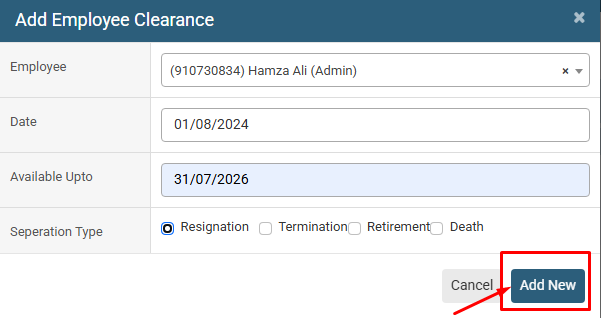
How to Add Employee Clearance : In the Add Employee Clearance window, select the required Employee from the dropdown list.
Enter the Date of the employee clearance.
Enter the Available Upto date to define the clearance validity period.
Select the appropriate Separation Type, such as Resignation, Termination, Retirement, or Death.
Select the appropriate Separation Type, such as Resignation, Termination, Retirement, or Death.
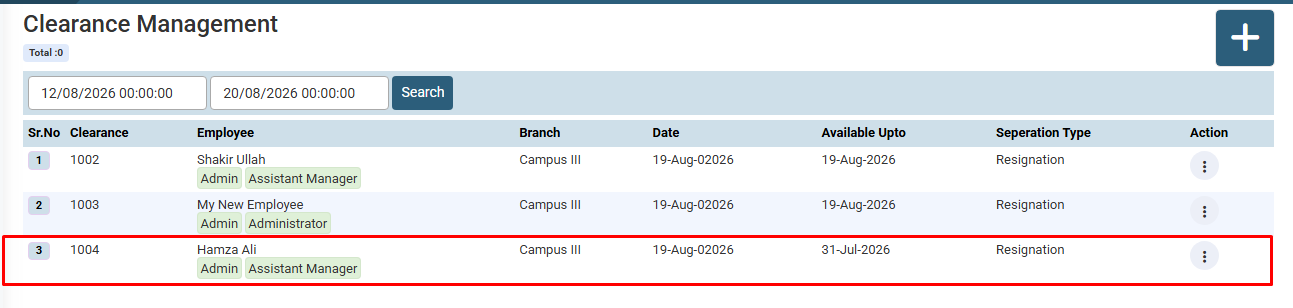
How to Add Employee Clearance :
Review the entered details and click on the Add New button to create the employee clearance reco
No video tutorial available.
No related articles found in this category.
