
Detailed Description
Section is used to categorize employees based on their department or work area, such as Admin, HR, Finance, or IT. Employee records can then be organized and managed according to their assigned section.
1. Click on Employee > Setup.
2. Click on + icon.
3. Select Global Section Enter Section , other name , parent , priority etc and click on save button.
1. Click on Employee > Setup.
2. Click on + icon.
3. Select Global Section Enter Section , other name , parent , priority etc and click on save button.
Visual Walkthrough
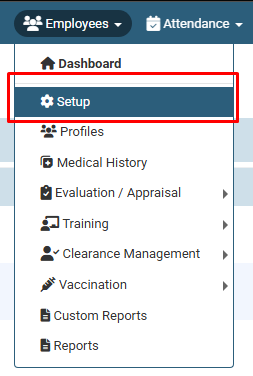
How To Create a New Section in HR :
Click on Employee >
Setup.
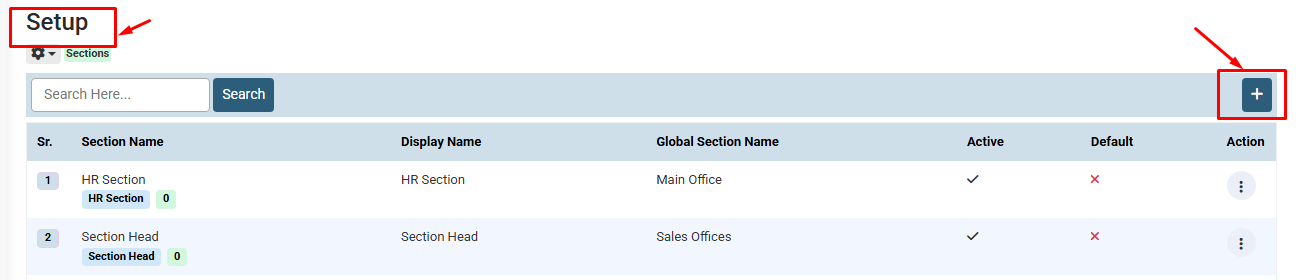
How To Create a New Section in HR :
Click on + icon.
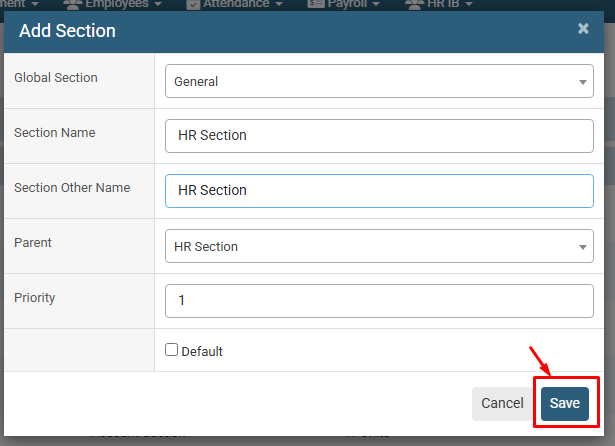
How To Create a New Section in HR :
Select Global Section Enter Section ,
other name , parent , priority etc and click
on save button.
No video tutorial available.
No related articles found in this category.
