
Manage Employee Profile allows users to view, update, and modify an employee’s record, including personal details, placement information, documents, and other relevant employee data.
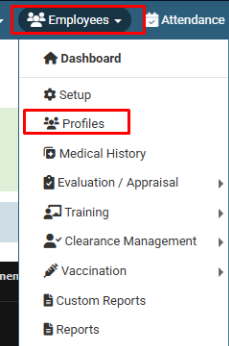
Click on Employees > Profiles. Enter Employee Name, Father Name, etc., or use filters like Department/Designation and click on the Load button. Click on Action (three dots) and then click on Edit. Navigate through the tabs (Personal Info, Placement, Shift, Documents, etc.) to update specific details of the employee. After making the necessary changes, click on the Save button to update the profile.
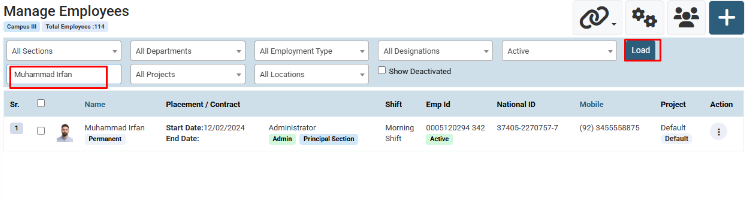
Enter Employee Name and Click on the Load Button. (You can also use filters for search like Department, Designation, etc.)
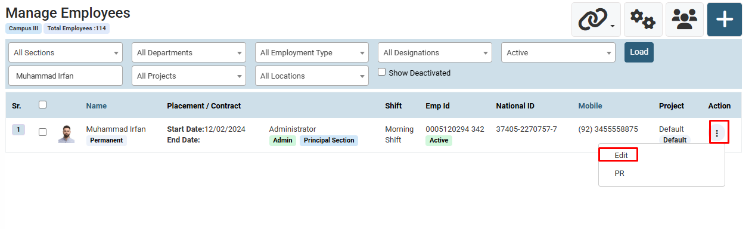
Click on the Action icon and then click on Edit.
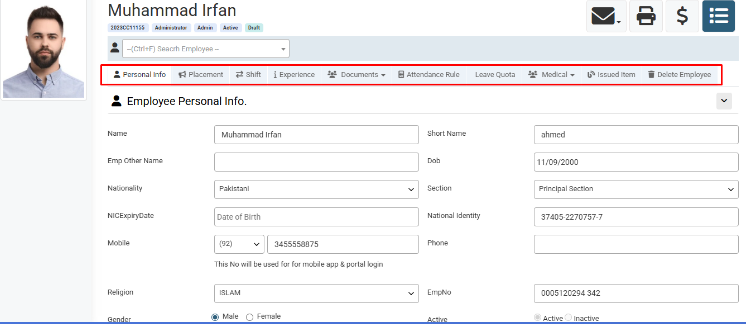
Navigate through the tabs like Personal Info, Placement, Shift, Experience, and Documents to update the required details.
Click on the Save button to update the Employee Profile.
No video tutorial available.
No related articles found in this category.
