
Approval Management allows users to add and configure approval settings for employee evaluations and appraisals by defining the applicant and approver departments, designations, sections, and approval levels.
1. Click on Employees > Evaluation / Appraisal > Approval Management.
2. On the Approval Management page, click on the “+” (Add Approval Settings) button.
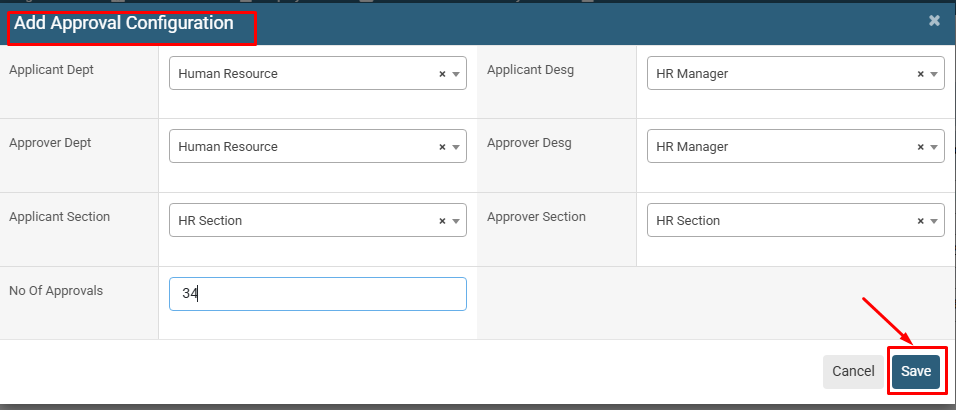
3. In the Add Approval Configuration window, select the required Applicant Department, Applicant Designation, Applicant Section, Approver Department, Approver Designation, and Approver Section.
4. Enter the required No Of Approvals to define the number of approval levels required.
5. Review the entered approval configuration details and click on the Save button to add the approval settings.
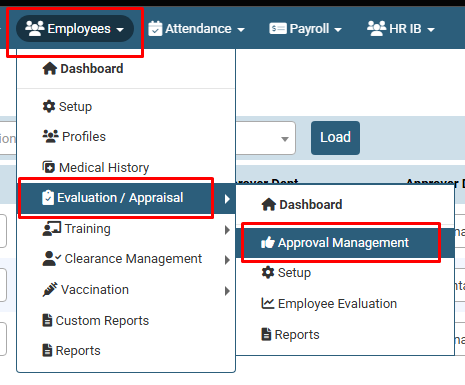
Click on Employees > Evaluation / Appraisal > Approval Management.
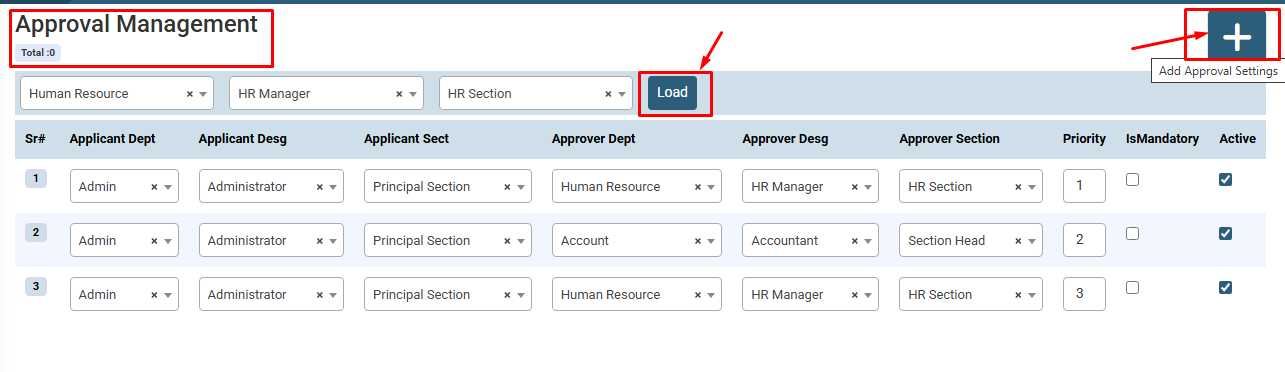
On the Approval Management page, click on the “+” (Add Approval Settings) button
No video tutorial available.
No related articles found in this category.
