
The Add Employee Training Session feature
enables HR administrators to organize specific training events and define their
operational details. By setting up these sessions, you can manage enrollment
dates, allocate training to specific departments, and configure cost-sharing
between the organization and employees.
1. Navigate to the Employees menu,
select the Training category, and then click on Employee
Training from the sub-menu options.
2. Once on the Employee Training dashboard,
click the "+" (Add) button located at the top right
corner to initiate the new session creation.
3. Fill in the required details including Training
Program, Dates, Fees, and Percentage allocations, then click the Save button
to schedule the session.
4. Review the Active status (green
checkmark) to ensure the training session is live and visible for employee
enrollment and tracking.
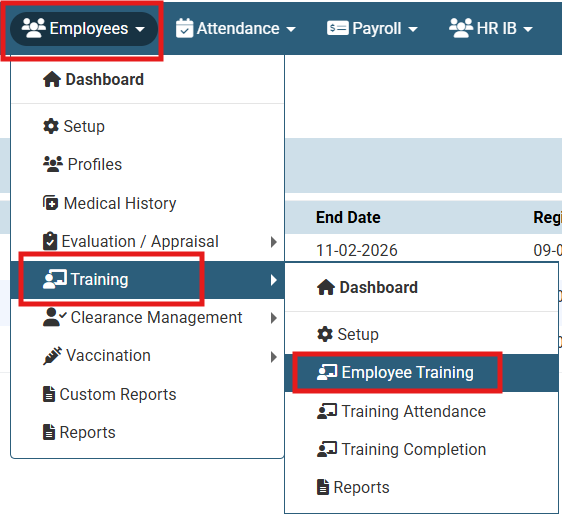
Navigate to the Employees menu, select the Training category, and then click on Employee Training from the sub-menu options.

Once on the Employee Training dashboard, click the "+" (Add) button located at the top right corner to initiate the new session creation.
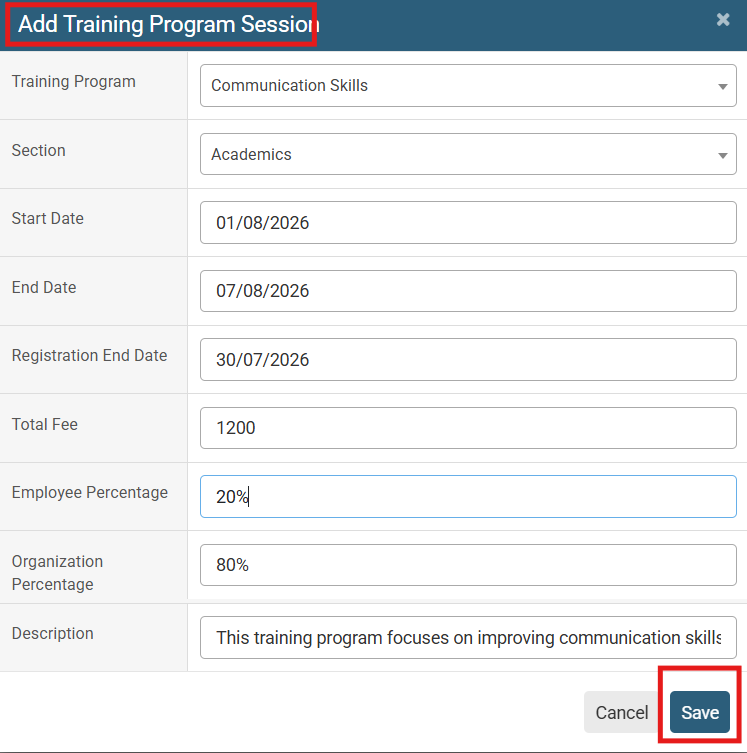
Fill in the required details including Training Program, Dates, Fees, and Percentage allocations, then click the Save button to schedule the session.

Review the Active status to ensure the training session is live and visible for employee enrollment and tracking.
No video tutorial available.
No related articles found in this category.
