
Detailed Description
Add New Training Program Type allows users to create and manage new training categories within the system.
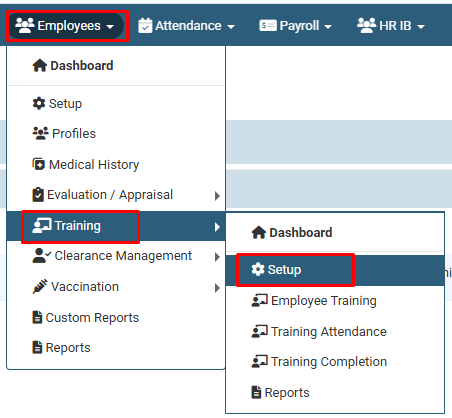
1. Navigate to Employees > Training > Setup.
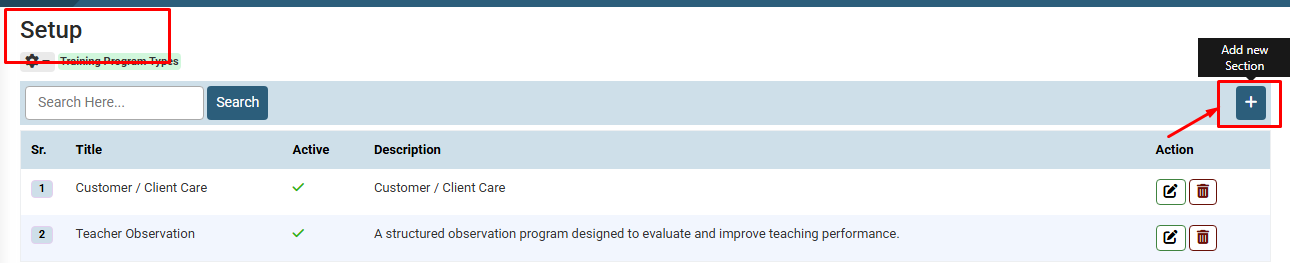
2. Click on the + (Add new Section) button located at the top right corner of the table.
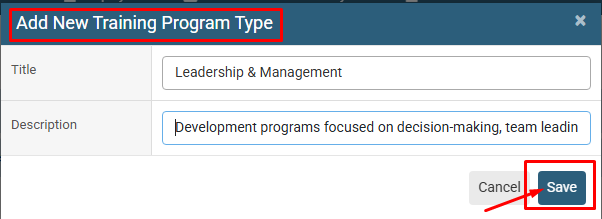
3. In the pop-up modal, enter the Title and Description for the training program type.
4. Click on the Save button.
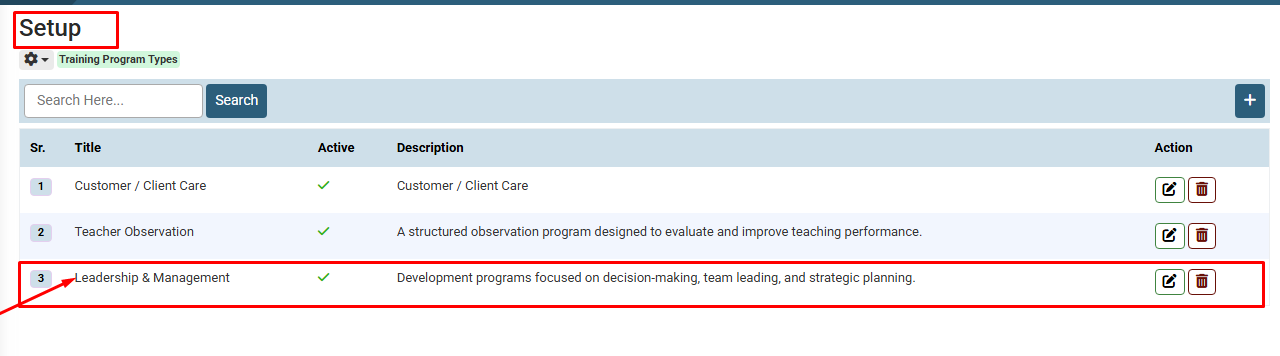
5. The updated record will be displayed in the list.
1. Navigate to Employees > Training > Setup.
2. Click on the + (Add new Section) button located at the top right corner of the table.
3. In the pop-up modal, enter the Title and Description for the training program type.
4. Click on the Save button.
5. The updated record will be displayed in the list.
Visual Walkthrough
How to Add New Section in Training :
Navigate to Employees > Training > Setup.
How to Add New Section in Training :
Click on the + (Add new Section) button located at the top right corner of the table.
How to Add New Section in Training :
In the pop-up modal, enter the Title and Description for the training program type
Click on the Save button.
How to Add New Section in Training :
The updated record will be displayed in the list.
No video tutorial available.
No related articles found in this category.
