
The Delete Training Program Type feature enables HR administrators to maintain a clean and relevant list of training categories by removing programs that are no longer offered or necessary. By managing these records, you ensure that only active and pertinent training options are available for selection, which streamlines employee development tracking and helps in accurate reporting.
Click on Employees and select the Training option from the dropdown menu. Locate the specific training program from the list and click on the Delete (Trash icon) button. A confirmation box will appear; click the Confirm button to permanently remove the record from the system.
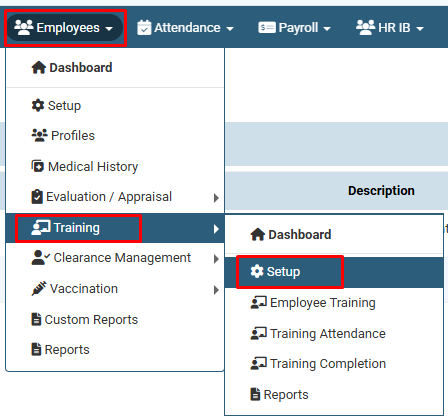
Click on Employees and select the Training option from the dropdown menuand then select setup option to access the program list.
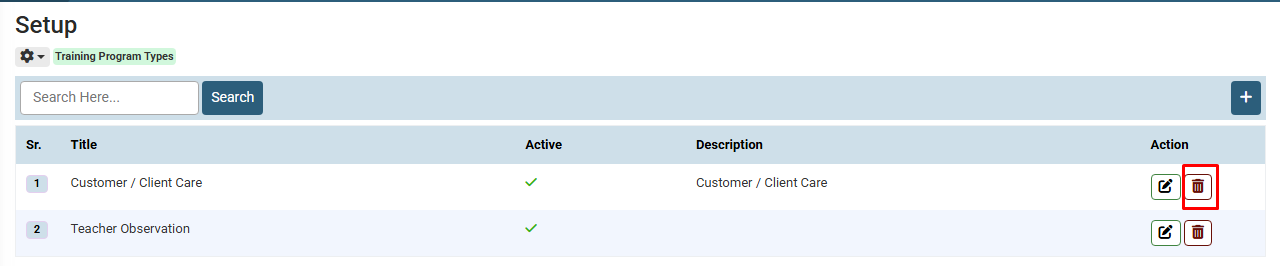
Locate the specific training program you want to remove and click on the Delete (Trash icon) button.
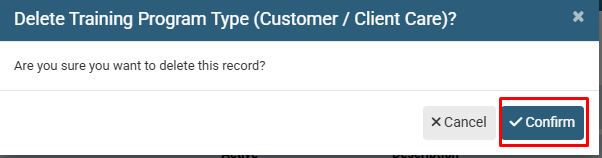
Once the confirmation message appears, click the Confirm button to permanently delete the record from the system.
No video tutorial available.
No related articles found in this category.
