
The Edit Training Program Type feature
provides HR administrators with the flexibility to refine training categories
as organizational needs change. By updating program titles and descriptions,
you can maintain a high standard of data integrity within your training module,
making it easier to track and report on employee skill development and
professional growth.
1.Click on Employees and select the Training option
from the dropdown menu to access the training list.
2. Find the specific program you want to modify (e.g., Teacher Observation) and
click on the Edit (Pencil icon) button.
3. Make the necessary changes to the Title, Description,
or Status, and then click the Update button to
save the new information.
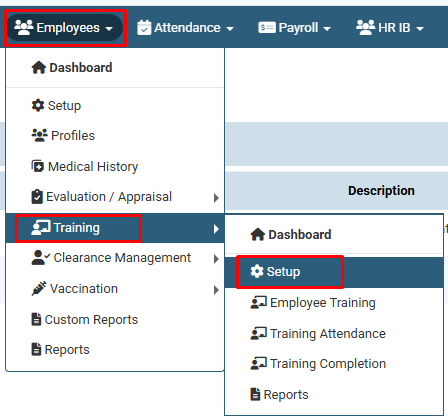
Click on Employees and select the Training option from the dropdown menu
and then select setup option to access the program list.
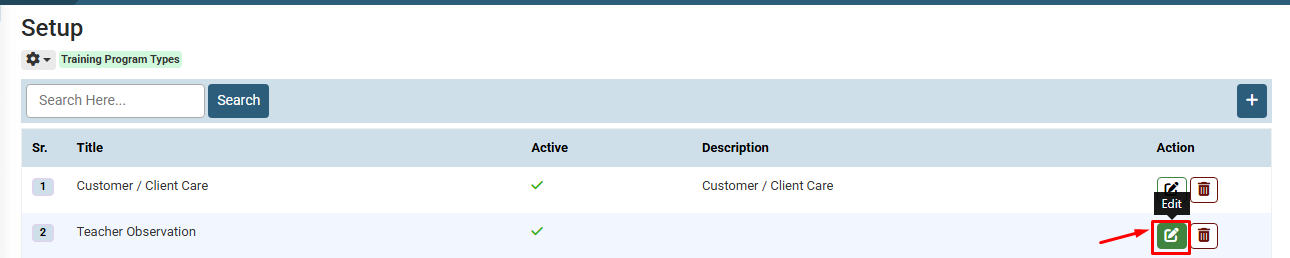
Find the specific program you want to modify (e.g., Teacher Observation) and click on the Edit (Pencil icon) button.
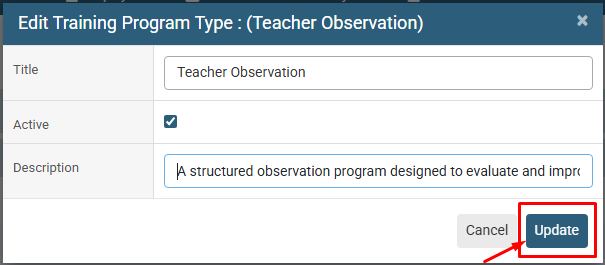
Make the necessary changes to the Title, Description, or Status, and then click the Update button to save the new information.
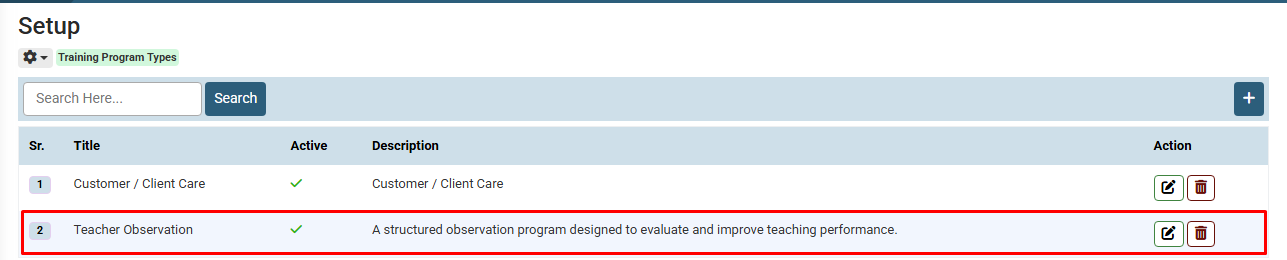
The Updated Training Program Type
No video tutorial available.
No related articles found in this category.
