
The Designation feature allows users to define official job titles (e.g., Principal, Vice Principal, Shopkeeper) within the system. Setting up designations is essential for categorizing employees, managing payroll structures, and assigning specific system permissions based on user groups.
Click on Configuration > Designations. To add a new record, click on the + (Plus) button located at the top right corner of the page. In the Create Designation window, fill in the following details: Global Designation Name: Select the standard category for the role. Designation Name: Enter the specific title used in your organization. Default User Group: Select the appropriate user group to define system access levels. Priority: Enter a numerical value to define the hierarchy (e.g., 1 for the highest rank).
Click on the Create button to save the new designation.
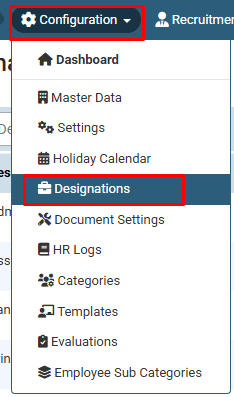
1. Click on Configuration and select Designations from the dropdown menu.
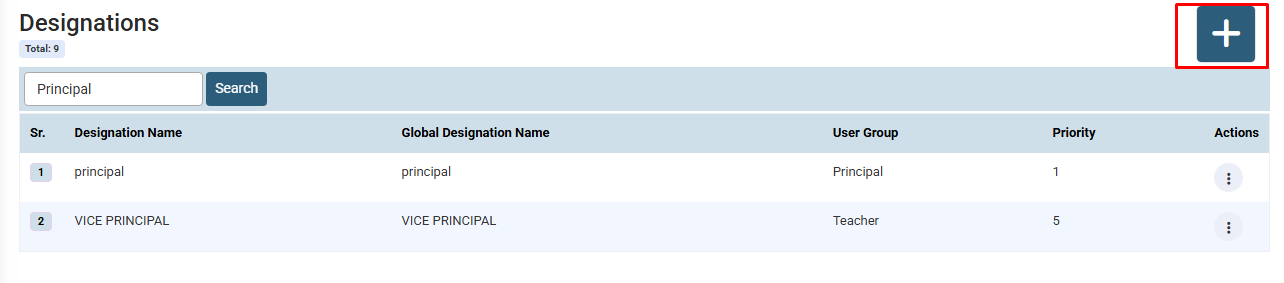
2. Click on the + (Plus) button at the top right corner to add a new designation.
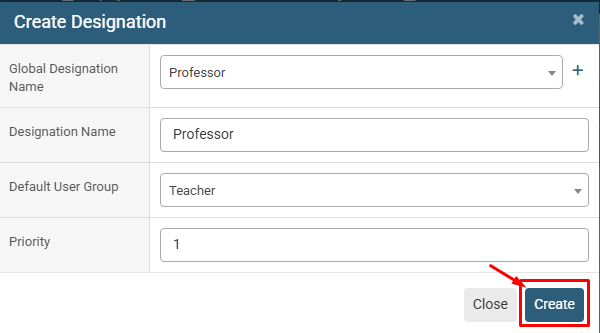
In the Create Designation window, fill in the following details:
Global Designation Name: Select the standard category for the role. Designation Name: Enter the specific title used in your organization. Default User Group: Select the appropriate user group to define system access levels. Priority: Enter a numerical value to define the hierarchy (e.g., 1 for the highest rank).
No video tutorial available.
No related articles found in this category.
