
Add Holidays allows users to create and configure holiday entries in the Holiday Calendar by entering the holiday title, date range, type, and comments.
1. Click on Configuration > Holiday Calendar.
2. On the Holiday Calendar page, click on the “+” (Add) button.
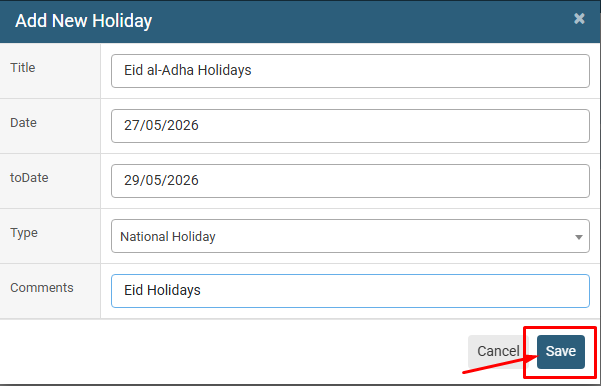
3. In the Add New Holiday window, enter the Title of the holiday.
4. Select the Date and toDate to define the holiday period.
5. Select the appropriate Type, such as National Holiday.
6. Enter relevant Comments about the holiday.
7. Review the entered details and click on the Save button to add the holiday to the Holiday Calendar.
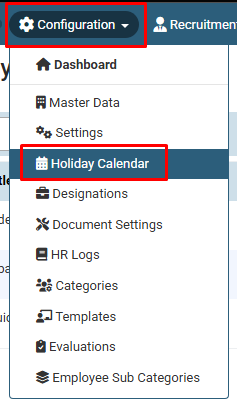
Click on Configuration > Holiday Calendar.
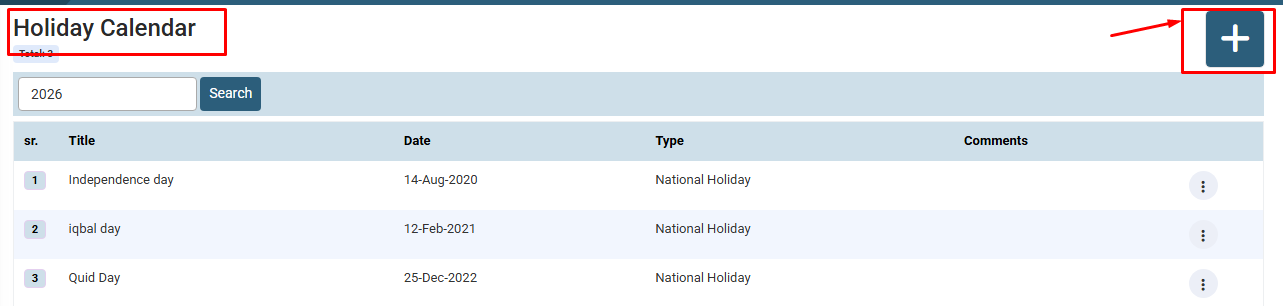
On the Holiday Calendar page, click on the “+” (Add) button.
No video tutorial available.
No related articles found in this category.
