
Detailed Description
Allowances and Deductions allow users to define and manage payout components or deduction heads for payroll processing.
1. Navigate to HR IB > Allowance And Deduction.
2. Click on the + (Add) button located at the top right corner.
3. In the pop-up modal, enter the Allowance / Deduction Name and select the Type (e.g., Deduction (Dr) or Allowance (Cr)).
4. Click on the Save button.
Visual Walkthrough
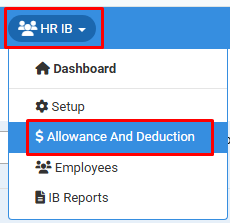
How to Add Allowance and Deduction :
Navigate to HR IB > Allowance And Deduction.
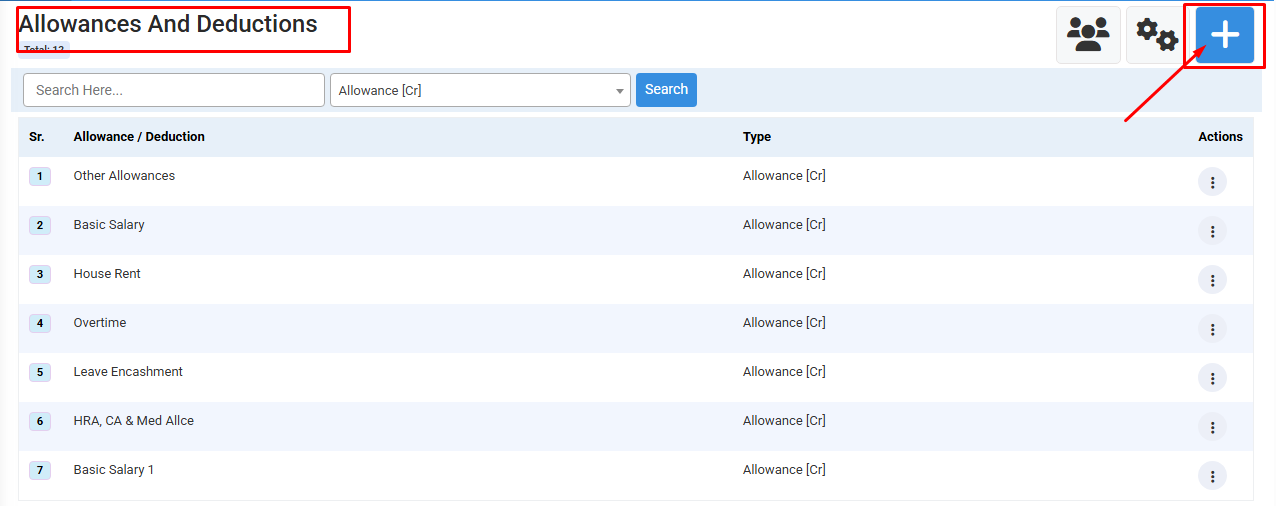
How to Add Allowance and Deduction :
Click on the + (Add) button located at the top right corner.
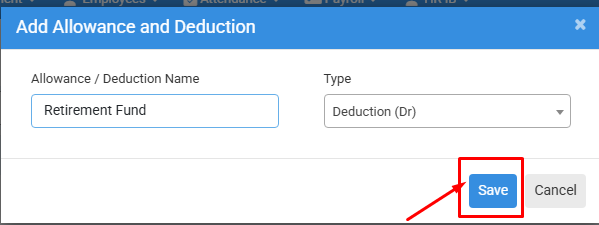
How to Add Allowance and Deduction :
In the pop-up modal, enter the Allowance / Deduction Name and select the Type (e.g., Deduction (Dr) or Allowance (Cr)).
Click on the Save button.
No video tutorial available.
No related articles found in this category.
