
Detailed Description
How to Add New Employee Category allows HR administrators to create new employee classification categories. This feature helps organize workforce efficiently for better management and reporting in Futex HR system.
1. Navigate to HR IB>Setup
2. Click the "+" button to open the Add Employee Category dialog box.
3. Enter the Category Title (e.g., IT Staff, Manager, Executive, etc.).
4. Click "Add Category" button to save the new category.
5. The new employee category appears in the categories list for use.
Visual Walkthrough
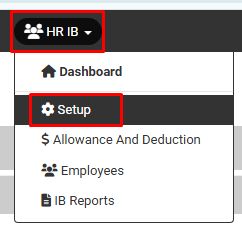
How to Add New Employee Category :
Navigate to HR IB>Setup
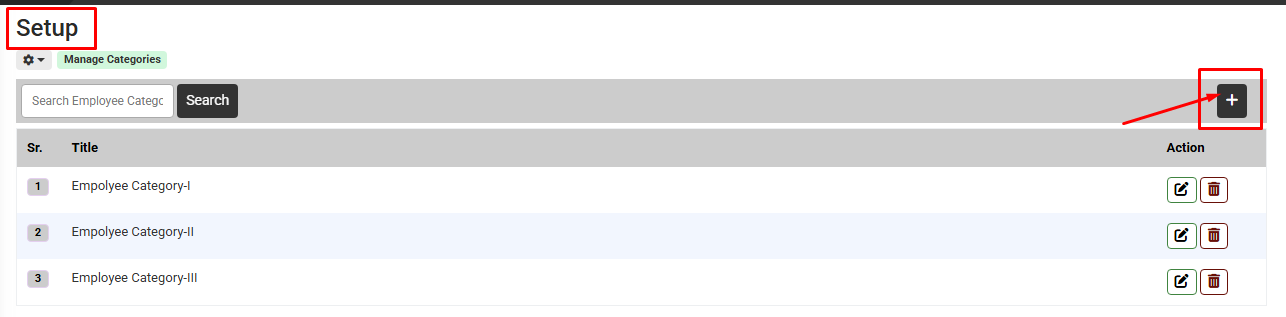
How to Add New Employee Category :
Click the "+" button to open the Add Employee Category dialog box
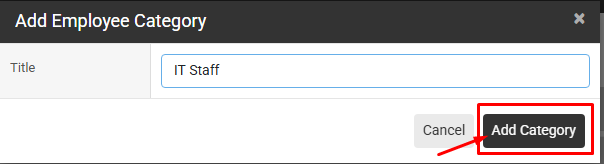
How to Add New Employee Category : Enter the Category Title (e.g., IT Staff, Manager, Executive, etc.). Click "Add Category" button to save the new category.
The new employee category appears in the categories list for use
The new employee category appears in the categories list for use
No video tutorial available.
No related articles found in this category.
