
Add Interview Board allows users to create and manage interview boards in Futex HR, helping organize interview panels for the recruitment process.
1. Click on Recruitment > Interview Board.
2. Click on the + (Add) button at the top-right corner.
3. Enter the Interview Board Name in the provided field.
4. Click on the Add button to create the new interview board.
5. The newly added interview board will appear in the Interview Board list.
6. To modify an existing interview board, click on the Action (⋮) menu and select Edit.
7. To remove an interview board, click on the Action (⋮) menu and select Delete.
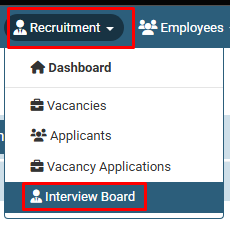
Click on Recruitment > Interview Board.
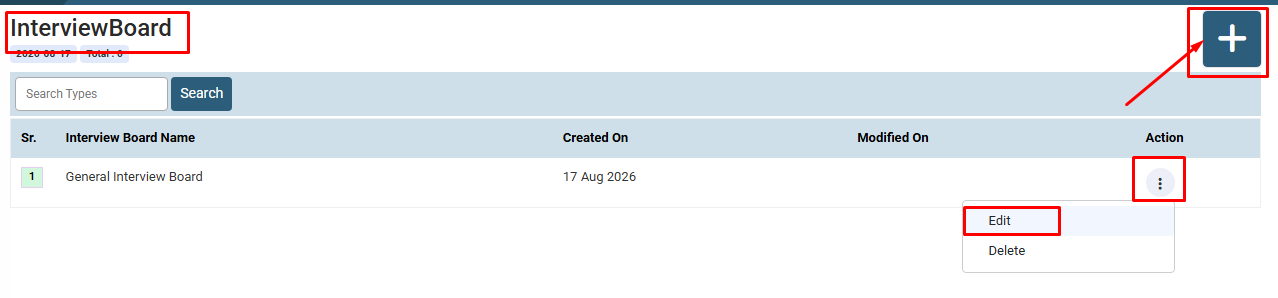
Click on the + (Add) button at the top-right corner.
To modify an existing interview board, click on the Action (⋮) menu and select Edit.
To remove an interview board, click on the Action (⋮) menu and select Delete.
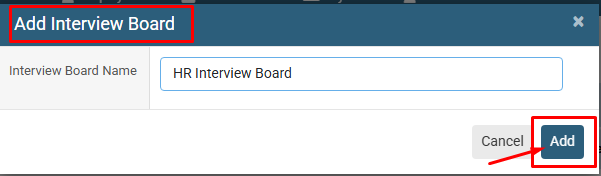
The newly added interview board will appear in the Interview Board list.
No video tutorial available.
No related articles found in this category.
