
Detailed Description
Add New Vacancy allows users to create a new job vacancy by entering vacancy details, including the vacancy title, number of positions, vacancy duration, and description.
1. Click on Recruitment > Vacancies.
2. Click on the + (Add) button to create a new vacancy.
3. Enter the Title, No Of Positions, From Date, To Date, and Description.
4. Review the entered vacancy details and make sure all required information is correct.
5. Click on the Save button to create the new vacancy.
Visual Walkthrough
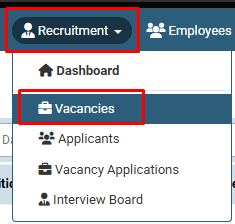
How to Add New Vacancy :
Click on Recruitment > Vacancies.
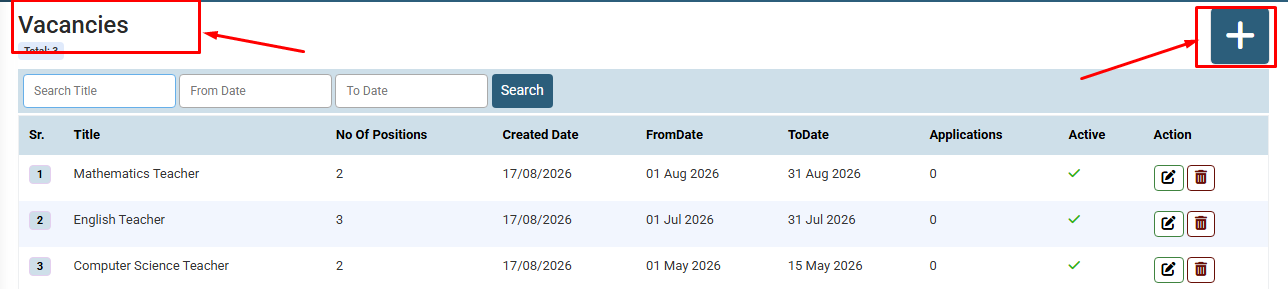
How to Add New Vacancy :
Click on the + (Add) button to create a new vacancy.
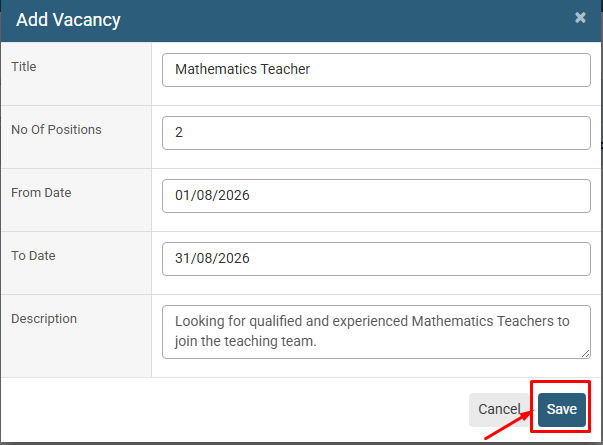
How to Add New Vacancy : Enter the Title, No Of Positions, From Date, To Date, and Description. Review the entered vacancy details and make sure all required information is correct. Click on the Save button to create the new vacancy
No video tutorial available.
No related articles found in this category.
